FatFS
-
FatFs Repo, BoxLambda fork,
boxlambdabranch: https://github.com/epsilon537/fatfs/tree/boxlambda -
FatFs Submodule in the BoxLambda Directory Tree: sub/fatfs/.
-
FatFs Website: http://elm-chan.org/fsw/ff/00index_e.html
-
FatFs Software Component in the BoxLambda Directory Tree: sw/components/fatfs
-
Included in OS: Yes
FatFs is a lightweight software library for small systems that implements FAT file system support. It's written in ANSI C89 and has no dependencies other than a minimal C environment. It'll compile out of the box in virtually any environment.
The FatFs library does not provide the device/media-specific Storage Device Controls. Those have to come from the device implementer. The BoxLambda fatfs component provides the following modules:
- The Storage Device Control Dispatcher, diskio.cpp, dispatches FAT FS requests to RAM Disk Device Control or SD Card Device controls, depending on selected volume.
- The RAM Disk Device Controller.
- The SD Card Device Controller.
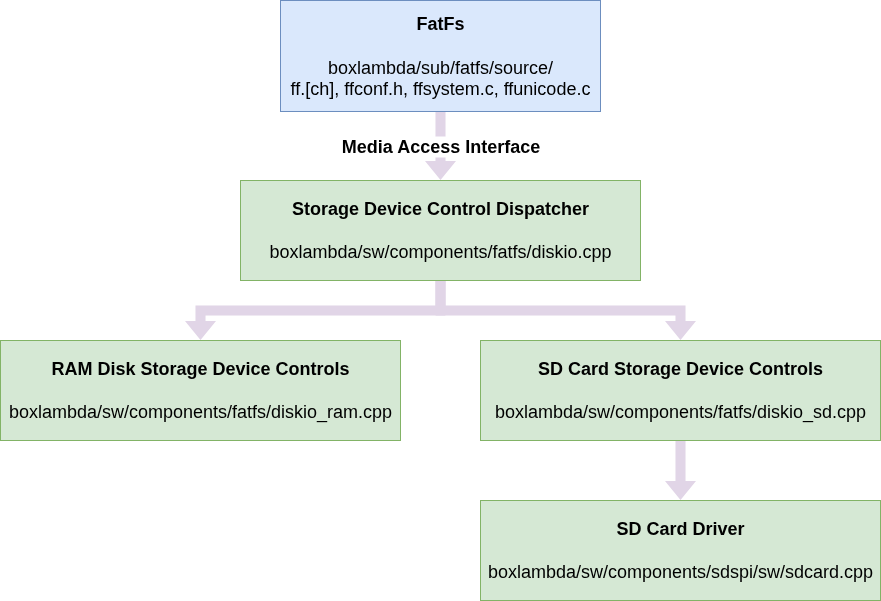
FatFs Media Access Interface.
The RAM Disk Device Controller
Volume name: ram::
The RAM Disk Device Controller treats a given memory region as a RAM disk. This allows an external host to easily transfer disk images to or from the target. See target.py.
The BoxKern configures external memory region 0x2ff00000-0x30000000 (1MB) for RAM disk usage. See the link map.
The SD Card Device Controller
Volume name: sd0::
The SD Card Device Controller relies on ZipCPU's SD Card driver for its implementation. See the SDSPI software component.
FatFs Configuration
FatFs is very configurable, so you can trade options for footprint.
All configuration options are well-documented and centralized in the ffconf.h file.
Relative to the default settings, I modified the following:
- Enable FF_USE_FIND: filtered directory read functions,
f_findfirst()andf_findnext(). - Enable FF_USE_STRFUNC: string functions,
f_gets(),f_putc(),f_puts()andf_printf(), with LF-CRLF conversion. - Enable FF_FS_RPATH: support for relative paths.
- Enable FF_USE_LFN with FF_MAX_LFN=32.
- Enable FF_USE_EXPAND: support for
f_expandfunction. - FF_VOLUME_STRS sd0 and ram.
https://github.com/epsilon537/fatfs/blob/boxlambda/source/ffconf.h
FatFs_Test
FatFs itself does not provide a test suite, but I found a simple test sequence in another project. I used that code as the starting point for a BoxLambda fatfs_test.