The VERA Software Stack
-
Included in OS: No
-
Exported to Forth: No
The VERA Software Stack consists of three layers:
- VERA C++ HAL: The VERA Hardware Abstraction Layer C++ API.
- VERA uLisp HAL: The VERA Hardware Abstraction Layer uLisp API. This API maps directly to the C++ API.
- VERA uLisp Convenience API (Experimental): A more expressive, higher level API using keyword arguments built on top of the VERA uLisp HAL.

The VERA Software Stack.
The VERA API Concepts

The VERA API Concepts.
- Pixels reference, by index, colors in a configurable 256-color palette. In 8 bpp mode, the entire palette can be referenced. In 4 bpp or 1 bpp mode, only a subset of the palette can be selected.
- Tiles contain pixels in a grid. Tiles can be as small as 8x8 pixels, or as large as a 640x480 bitmap.
- Tilesets are groups of tiles with shared properties: tile width, tile height, and bits-per-pixel (bpp).
- Maps organize the screen (or rather, a screen layer) into a grid. The grid elements / map entries reference, by index, tiles belonging to a single tileset. This map mechanism can be used to set up a text mode grid consisting of 8x8 1bpp tiles (the font). It can also be used to present a grid of 16x16 8 bpp color tiles in a side-scrolling shooter.
- VERA has two layers, layer 1 sitting in front of layer 0. Each layer can be configured into map/tileset mode or into bitmap mode. In bitmap mode, the layer references a single, bitmap-sized tile. Background colored pixels are transparent.
- VERA has two banks of 64 sprites. Sprites get their pixel data from tiles of up to 64x64 pixels. In addition to a x- and y- position, sprites have a z-depth attribute which puts the sprite in front of, between, or behind the two layers.
The C++ VERA HAL
VERA HAL: sw/components/vera/vera_hal.h
The VERA Hardware Abstraction Layer is a C++ class hierarchy:
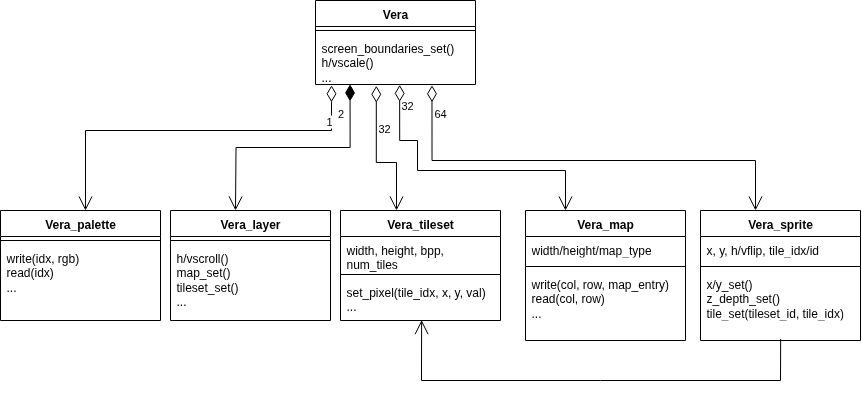
VERA Hardware Abstraction Layer (HAL).
The following classes are defined:
Vera_hal: This is the top-level object. Screen-global settings such as screen boundaries, scaling, and border color are configured at this level.Vera_halis also the access point to the other objects in the hierarchy.Vera_layer: Vera has two layers (not counting the sprite 'layer'). TheVera_layerclass handles layer-specific settings such as the tileset and map to use, horizontal and vertical scroll offset, etc.Vera_tileset: This class represents the pixel data of a collection of tiles in the most general sense. Tiles can be an 8x8 font in 1 bpp text mode, 16x16 multicolor tiles for use in a game tile map, 32x32 sprites, or even complete 640x480 bitmaps. Vera_tilesets allocate space in VRAM to hold the pixel data for the specified number of tiles.Vera_map: This class represents a map, or grid, in tile or text mode. The grid elements are addressed by column and row.Vera_sprite: This class holds all attributes of 1 sprite, including a reference to a tile (member of a tileset) containing the sprite's pixel data.Vera_palette: The 256 RGB palette colors can be set, retrieved, and restored here.
Note:
- There is no
Vera_tileclass. Tiles in a tileset share most of their properties (width/height/bpp). What isn't shared, a pointer to the tile pixel data in VRAM, can easily be computed from the index of the tile in the tileset. In this design, tiles are represented by a(tileset_id, tile_idx)tuple, wheretileset_idrefers to one of the 32 tileset objects, andtile_idxthe index of the tile within that tileset. - There is no
Vera_bitmapclass. Bitmaps are represented by theVera_tilesetclass by configuring a width of 320 or 640 pixels. A Vera layer is put into bitmap mode by calling Vera_layer::bitmap_set() and passing in the tile object representing the bitmap.
The uLisp VERA HAL
The above C++ HAL is integrated into the BoxLambda uLisp port as an extension:
sw/projects/ulisp/ulisp-boxlambda.cpp.
The uLisp version of the VERA HAL looks like this:
(vera_init)
(Re)Initialize Vera.
@return: nil


(vera_map map_id [width height map_type])
Initialize a map object, allocate VRAM resources. If only map_id is given,
retrieve map properties.
@param map_id: id of map object to initialize. Range: 0..VERA_NUM_MAPS-1.
@param width: width in tiles: 32/64/128/256.
@param height: height in tiles: 32/64/128/256.
@param map_type: VERA_MAP_TYPE_TXT16/TXT256/TILE.
@return: (map_base, width, height, map_type) or nil if map is not initialized.


(vera_map_deinit map_id)
Deinit map object, releasing its VRAM resources.
@param map: id of map object to deinit. Range: 0..VERA_NUM_MAPS-1.
@return: nil.


(vera_tileset tileset_id [width height bpp num_tiles])
Initialize a tileset object using given parameters. If only tileset_id is given,
retrieve tileset properties.
A tileset can be used to represent sets of regular tiles, sprites and bitmaps.
@param tileset: id of tileset object. Range: 0..VERA_NUM_TILESETS-1.
@param width: 8/16 for regular tiles. For sprites, additionally 32 and 64 are allowed. For bitmaps: 320 or 640.
@param height: 8/16 for regular tiles. For sprites, additionally 32 and 64 are allowed. For bitmaps: Range [1..65535].
@param bpp: 1/2/4/8. In case of spritesets, only 4 and 8 are allowed.
@param num_tiles: Number of tiles in the tileset. Range: 0..1023.
@return: (tileset_base, width, height, bpp, num_tiles, tilesize_bytes) or nil if tileset is not initialized.


(vera_tileset_deinit tileset_id)
Deinit tileset object, releasing its VRAM resources.
@param tileset: id of tileset object to deinit. Range: 0..VERA_NUM_TILESETS-1.
@return: nil.


(vera_line_capture_enable [enable])
Enable VGA line capture at the line IRQ scanline and retrieve the line capture pending state.
@param enable: 1/0 enables/disables VGA line capture.
@return: 1 if line capture is pending, 0 if line capture has been completed/is disabled.


(vera_line_capture_read_pixel x
Read the RGB value of a pixel from the captured VGA line.
@param x: Range: 0..639.
@return: (r, g, b).


(vera_sprites_enable [enable])
Enable/disable the sprite renderer and/or retrieve the current sprite renderer state.
@param enable: 1/0 enables/disables the sprite renderer.
@return: 1/0 if the sprite renderer is enabled/disabled.


(vera_sprite_bank [bank])
Set or get the active sprite bank.
@param bank: the active sprite bank. Range: 0..1.
@return: the active sprite bank.


(vera_ien [irq_mask enable])
Enable/disable VERA IRQs.
@param irq_mask: Bitmask of IRQs to enable/disable.
@param enable: if 1, irq_mask is an enable mask, if 0, irq_mask is a disable mask.
@return: Bitmask of enabled irqs.


(vera_isr [irq_mask])
Get bitmask of active IRQs and acknowledge IRQs
@param irq_mask: Bitmask of IRQs to acknowledge.
@return: Bitmask of active irqs.


(vera_irqline [scanline])
Set or get the scanline used to trigger line IRQs.
@param scanline: Range: 0..524.
@return: the line IRQ scanline.


(vera_scanline)
@return: the current VGA scanline.


(vera_display_enable [enable])
Enable/disable the display and/or retrieve the current display state.
@param enable: 1/0 enables/disables the display.
@return: 1/0 if the display is enabled/disabled.


(vera_hscale [scalefactor])
Set or get the horizontal scalefactor.
@param scalefactor: The horizontal scale factor. Floating point value.
1.0 means 1 output pixel for 1 input pixel. 0.5 means 2 output pixels for 1 input pixel (zoom in).
@return: the horizontal scalefactor.


(vera_vscale [scalefactor])
Set or get the vertical scalefactor.
@param scalefactor: The vertical scale factor. Floating point value.
1.0 means 1 output pixel for 1 input pixel. 0.5 means 2 output pixels for 1 input pixel (zoom in).
@return: the horizontal scalefactor.


(vera_bordercolor [color_index])
Set or get the bordercolor.
@param colorindex: the palette index of the border color.
@return: the bordercolor index.


(vera_screen_boundaries [hstart hstop, vstart, vstop]])
Set or get the screen boundaries.
@param hstart: Range: 0..hstop-1
@param hstop: Range: hstart+1..1023
@param vstart: Range: 0..vstop-1
@param vstop: Range: vstart+1..1023
@return: (hstart hstop vstart vstop).


(vera_layer_enable layer [enable])
Enable/disable the given layer and/or retrieve the current layer state.
@param layer: 1/0: the layer id.
@param enable: 1/0: enables/disables the layer.
@return: 1/0: if the given layer is enabled/disabled.


(vera_layer_hscroll layer [offset])
Set or get the layer's horizontal scroll offset.
@param layer: 1/0: the layer id.
@param offset: 0.255 in bitmap mode, 0..4095 in tile mode.
@return: the layer's horizontal scroll offset.


(vera_layer_vscroll layer [offset])
Set or get the layer's vertical scroll offset.
@param layer: 1/0: the layer id.
@param offset: 0.255 in bitmap mode, 0..4095 in tile mode.
@return: the layer's vertical scroll offset.


(vera_layer_map layer [map_id])
Set or get the layer's map.
@param layer: 1/0: the layer id.
@param map_id: the id of the map object whose properties to use. Range: 0..VERA_NUM_MAPS-1.
@return: the layer's current map_id or nil if no map is currently set.


(vera_layer_tileset layer [tileset_id])
Put the layer in tilemode using the given tileset's properties.
@param layer: 1/0: the layer id.
@param tileset_id: the id of the tile object whose properties to use. Range: 0..VERA_NUM_TILESETS-1.
@return: the layer's current tileset_id or nil if no tileset is currently set.


(vera_layer_bitmap layer [tileset_id tile_idx])
Put Layer in Bitmap Mode, using the given bitmap object's properties
@param layer: 1/0: the layer id.
@param tileset_id: id of tileset holding the bitmap. Range: 0..VERA_NUM_TILESETS-1.
@param tile_idx: idx of the bitmap within the tileset. Range: 0..1024.
@return: (tileset_idx tile_idx) or nil if not in bitmap mode.


(vera_layer_pal_offset layer [offset])
Assuming bitmap mode, set or get the layer's palette offset.
@param layer: 1/0: the layer id.
@param offset: the palette offset to use. Range: 0..15.
The color index of bitmap pixels is modified by the palette offset using the following logic:
- Color index 0 (transparent) and 16-255 are unmodified.
- Color index 1-15 is modified by adding 16 x palette offset.
@return: the layer's current palette offset.


(vera_palette [idx [r g b]])
Set or get the rgb value at the given palette index.
If not parameters are given, the default palette is restored.
@param idx: the paletter color index. Range: 0..255.
@param r: The red component intensity. Range: 0..15.
@param g: The green component intensity. Range: 0..15.
@param b: The blue component intensity. Range: 0..15.
@return: (r g b) or nil if invoked without parameters.


(vera_sprite_init sprite_id)
(Re)Init the sprite object.
@param sprite_id: the sprite_id. Range: 0..127.
@return: nil


(vera_sprite_tile sprite_id [tileset_id tile_idx])
Get or set the sprite's tile containing the sprite's pixel data.
Attributes width, height and bpp are taken from the tileset.
@param sprite_id: the sprite_id. Range: 0..127.
@param tileset_id: tileset with which this sprite is associated. Range: 0..VERA_NUM_TILESETS-1.
@param tile_idx: the index of the tile in the tileset containing the sprite's pixel
data. Range: 0..tileset.num_tiles.
@return: (tileset_id, tile_idx) or nil if currently no tile is configured for this sprite


(vera_sprite_x sprite_id [x])
Get or set the sprite's x position.
@param sprite_id: the sprite_id. Range: 0..127.
@param x: Range: 0..1023.
@return: the sprite's x position


(vera_sprite_y sprite_id [y])
Get or set the sprite's y position.
@param sprite_id: the sprite_id. Range: 0..127.
@param y: Range: 0..1023.
@return: the sprite's y position


(vera_sprite_pal_offset sprite_id [pal_offset])
Get or set the sprite's palette offset.
@param sprite_id: the sprite_id. Range: 0..127.
@param offset: the palette offset to use. Range: 0..15.
The color index of sprite pixels is modified by the palette offset using the following logic:
- Color index 0 (transparent) and 16-255 are unmodified.
- Color index 1-15 is modified by adding 16 x palette offset.
@return: the sprite's current palette offset.


(vera_sprite_col_mask sprite_id [mask])
Get or set the sprite's collision mask.
@param sprite_id: the sprite_id. Range: 0..127.
@param mask: the collision mask. Range: 0..15.
@return: the sprite's current collision_mask.


(vera_sprite_z_depth sprite_id [z_depth])
Get or set the sprite's z_depth.
@param sprite_id: the sprite_id. Range: 0..127.
@param z_depth: VERA_SPRITE_Z_DIS/BG_L0/L0_L1/L1.
@return: the sprite's current z_depth.


(vera_sprite_hflip sprite_id [hflip])
Get or set the sprite's hflip state.
@param sprite_id: the sprite_id. Range: 0..127.
@param hflip: 0 or 1.
@return: the sprite's current hflip value.


(vera_sprite_vflip sprite_id [vflip])
Get or set the sprite's vflip state.
@param sprite_id: the sprite_id. Range: 0..127.
@param vflip: 0 or 1.
@return: the sprite's current vflip value.


(vera_map_entry map_id col row [entry])
Set or get a 16-bit map entry.
@param map_id. Range: 0..VERA_NUM_MAPS-1.
@param col: the map column. Range: 0..map width-1.
@param row: the map row. Range: 0..map height-1.
@param entry: the 16-bit entry value.
@return: 16-bit map entry.


(vera_tileset_pixel tileset_id tile_idx x y [val])
Set or get a tile pixel.
@param tileset_id.
@param tile_idx: Index into the tileset. Range: 0..num_tiles-1.
@param x: the pixel x position. Range: 0..tile width-1.
@param y: the pixel y position. Range: 0..tile height-1.
@param val: the pixel value. Range: 0..(2^bpp)-1.
@return: pixel value
The uLisp VERA Convenience API
This is a more expressive, higher-level uLisp API. Command parameters are specified using keyword-value pairs as opposed to location-based values. The intent is to make uLisp scripts using the VERA Convenience API self-documenting.
Here's the API:
495045> (? vera)
Vera graphics API. General form: (vera :<action> [:<param keyword> [param value]] ...

(vera :init)
(vera :map <id> :width <w> :height <h> :map-type <t>)
(vera :map <id> :deinit)
(vera :map <id> :entry :x <x> :y <y> [:val <v>])
(vera :map <id> [:info])
(vera :tileset <id> :width <w> :height <h> :bpp <b> :num-tiles <n>)
(vera :tileset <id> :deinit)
(vera :tileset <id> [:info])
(vera :pixel :tileset <id> :tile <idx> :x <x> :y <y> [:val <v>])
(vera :linecapture :enable|:disable|:enabled)
(vera :linecapture :pixel :x <x>)
(vera :spritebank :select <idx>)
(vera :spritebank :selected)
(vera :ien :set|:clr :mask <m>)
(vera :ien :get)
(vera :isr :set :mask <m>)
(vera :isr :get)
(vera :irqline [<l>])
(vera :scanline)
(vera :display :enable|:disable|:enabled)
(vera :sprites :enable|:disable|:enabled)
(vera [:hscale <h>] [:vscale <v>])
(vera :hscale|:vscale)
(vera :bordercolor [<c>])
(vera :boundaries [:hstart <hs> :hstop <he> :vstart <vs> :vstop <ve>])
(vera :layer <id> :enable|:disable|:enabled)
(vera :layer <id> [:hscroll <h>] [:vscroll <v>])
(vera :layer <id> :hscroll|:vscroll)
(vera :layer <id> :map [<m>] [:tileset t])
(vera :layer <id> :tileset [<t>] [:map <m>])
(vera :layer <id> :bitmap [:tileset <t> :tile <i>])
(vera :layer <id> :pal-offset [<o>])
(vera :palette :restore)
(vera :palette <id> [:r <r> :g <g> :b <b>])
(vera :sprite <id> :init)
(vera :sprite <id> <sprite-attribute settings>)
  Where <sprite-attribute settings> is one or more of the following:
  :tileset <t> :tile <i>
  :x <x> / :y <y> / :z <z> / :pal-offset <o> / :mask <mask>
  :hflip :enable|:disable / :vflip :enable|:disable
(vera :sprite <id> <sprite-attribute>)
  Where <sprite-attribute> is one of the following:
  :tileset :x :y :z :pal-offset :mask :hflip :vflip
(vera :sprite <id> [:info])

495045>
The lisp code can be found here: sw/projects/ulisp/LispLibrary.lisp.
The VERA Convenience API is more expressive, but also slower than the lower-level uLisp VERA HAL API. For code that requires a level of performance, e.g., pixel drawing in a nested loop, it's better to use the uLisp VERA HAL API directly.
Example
The following example sets up a 32x32 grid of 4bpp 16x16 pixel tiles on layer 0. All map
entries reference tile 0 in tileset 0. Using vera :pixel, a yellow border is
drawn along the edges of the tile. The rest of the tile's pixels remain at
background color 0, which is set to a shade of blue (:r 8 :g 8 :b 15).
Tileset 1, tile 0, is set up to hold the pixel data of a 64x64 sprite. The entire
tile is filled with white pixels. The sprite is positioned at (x,y)=(128,88) in
front of layer 1.
(defvar map-sz 32)
(defvar tile-sz 16)
(defvar sprite-sz 64)
(defvar x 128)
(defvar y 88)
(defvar bpp 4)
(defvar scale 0.5)

(print "General setup...")
(vera :display :enable)
(vera :palette 0 :r 8 :g 8 :b 15)
(vera :hscale scale)
(vera :vscale scale)
(vera :sprites :enable)
(vera :tileset 0 :width tile-sz :height tile-sz :bpp bpp :num-tiles 1)
(vera :tileset 1 :width sprite-sz :height sprite-sz :bpp bpp :num-tiles 1)
(vera :map 0 :width map-sz :height map-sz :map-type +vera-map-type-tile+)
(vera :layer 0 :enable)
(vera :layer 0 :map 0)
(vera :layer 0 :tileset 0)

(print "Initializing map...")
(dotimes (ii map-sz)
(dotimes (jj map-sz)
  (vera-map-entry 0 ii jj 0)))

(print "Generating tile...")
(dotimes (ii tile-sz)
(vera :pixel :tileset 0 :tile 0 :x ii :y 0 :val +vera-color-yellow+)
(vera :pixel :tileset 0 :tile 0 :x 0 :y ii :val +vera-color-yellow+)
(vera :pixel :tileset 0 :tile 0 :x ii :y (1- tile-sz) :val +vera-color-yellow+)
(vera :pixel :tileset 0 :tile 0 :x (1- tile-sz) :y ii :val +vera-color-yellow+))

(print "Generating sprite tile...")
(dotimes (ii sprite-sz)
  (dotimes (jj sprite-sz)
     (vera-tileset-pixel 1 0 ii jj +vera-color-white+)))

(print "Setting up sprite...")
(vera :sprite 0 :init)
(vera :sprite 0 :tileset 1 :tile 0)
(vera :sprite 0 :z +vera-sprite-z-l1+)
(vera :sprite 0 :x x :y y))
The result looks like this (sorry for the potato picture quality):

VERA uLisp Example.